


∞ Figure Eight・Ocular Muscle Trainer
1. Product Overview
∞ Figure Eight・Ocular Muscle Trainer is an online visual training tool designed for office workers and heavy screen users. Targeting common eye discomforts including ocular muscle tension, visual fatigue, and dry eyes caused by prolonged close-range viewing and excessive digital screen exposure, it delivers scientific dynamic visual tracking training. The tool effectively relaxes eye accommodation muscles, boosts periorbital blood circulation, and relieves daily eye strain, enabling convenient eye relaxation training anytime at home or in the workplace.
2. Core Features
Equipped with versatile and user-friendly functions that balance scientific effectiveness, flexibility, and personalization, the tool adapts to diverse eye conditions and training needs:
2.1 Scientific ∞-Shaped Dynamic Trajectory Tracking
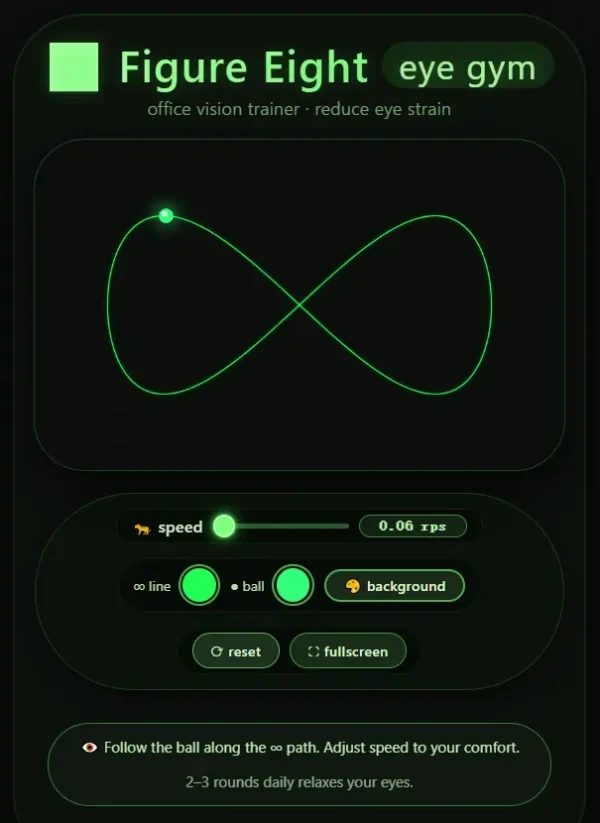
Following a standard horizontal figure-eight path, a moving ball travels in a continuous, uniform loop. It guides the eyes to perform comprehensive multi-directional movements including inward rotation, outward rotation, and vertical adjustment. This fully activates extraocular muscles, relieves eye stiffness caused by long-term fixed focal length, improves periorbital blood circulation, and fundamentally alleviates digital eye strain.
2.2 Full-Range Adaptive Speed Adjustment
Featuring a precision speed slider, the tool supports adjustable motion speeds ranging from 0.35 to 7.2 rad/s. The low-speed mode provides gentle relaxation for severe eye fatigue, while medium and high-speed modes enhance eye muscle flexibility and visual adjustment capability. Users can freely adjust the speed according to their eye fatigue level and training progress.
2.3 Fully Customizable Visual Interface
Three core visual parameters are independently adjustable: the color of the figure-eight trajectory line, the color of the moving training ball, and the page background color. Customizable color schemes avoid secondary visual irritation from harsh or mismatched colors, reduce visual distractions during training, and greatly improve viewing comfort and focus.
2.4 Full-Screen Immersive Training Mode
One-click full-screen mode blocks external distractions such as desktop pop-ups and message notifications. It creates a dedicated visual training environment for uninterrupted eye tracking practice and ensures stable and effective training results.
2.5 One-Click Parameter Reset
Restore all speed, color, and display settings to default with a single click. The simple and efficient reset function supports repeated use and multi-user sharing without manual parameter debugging.
3. Standard User Guide
No professional operation skills are required. Follow the standardized steps below for optimal training effects:
-
Posture Preparation: Open the tool page, sit upright, and look naturally at the center of the screen. Keep your head stationary and move only your eyeballs to follow the moving ball.
-
Speed Setting: Beginners or users with severe eye fatigue are recommended to start at a low speed to adapt to the training rhythm. Gradually increase the speed as your eyes get accustomed.
-
Visual Customization: Adjust the training interface freely via three settings: ∞ line (trajectory color), ● ball (moving dot color), and background (page background color).
-
Training Frequency: Complete 2 to 3 sessions daily, 1 to 2 minutes per session. Consistent long-term use effectively relieves ocular tension and persistent visual fatigue.
4. Target Users
Suitable for all groups with high-frequency eye usage and daily eye relaxation needs:
-
Office workers and students who spend long hours on computers, mobile phones, and other digital screens;
-
Healthy individuals experiencing daily eye strain, dryness, ocular muscle stiffness, and eye soreness;
-
Users who wish to improve eye flexibility and overall eye comfort through lightweight daily visual training;
-
Users without confirmed ophthalmic diseases who only need daily eye relaxation and visual adjustment exercises.
5. Safety Precautions
-
Stop training immediately and close your eyes for adequate rest if you experience eye pain, dizziness, nausea, blurred vision, or any other discomfort during practice. Do not continue training forcefully.
-
This tool is a digital auxiliary visual training solution for daily eye relaxation only. It cannot replace professional ophthalmic examinations, medical diagnosis, or clinical treatment.
-
Users with refractive errors such as myopia, hyperopia, or astigmatism are recommended to wear properly fitted corrective glasses during training to ensure maximum comfort and training effectiveness.
6. Important Product Statement
This is a pure digital online eye training service with no physical products or physical delivery required. The tool is designed solely for daily eye relaxation and ocular muscle training. It does not provide medical diagnosis, eye disease treatment, vision correction, or any other medical services. Please visit a formal medical institution for professional examination and treatment if you have eye diseases or abnormal vision conditions.



Reviews
There are no reviews yet.