
If you spend hours daily staring at computer monitors, tablets or smartphones, you have probably felt the discomfort: sore eyes, dry eyes, heavy eyeballs, or vision that takes extra time to refocus when you look away from screens. These are common signs of tight ciliary muscles and digital eye strain — exactly what near far eye accommodation training is designed to help with.
Our Near-Far Ocular Accommodation Trainer is an online visual training tool built on classic ophthalmic near-far vision principles. It helps screen users relax overworked ciliary muscles with simple browser-based eye exercises.
Table of Contents
- Why Long Screen Time Makes Your Ciliary Muscle Stiff
- Core Features of the Near-Far Ocular Accommodation Trainer
- Step-by-Step Guide to Near Far Eye Accommodation Training
- Who Is This Training Suitable For?
- Safety Precautions & Disclaimer
- Frequently Asked Questions
Why Long Screen Time Makes Your Ciliary Muscle Stiff
When you keep your eyes fixed on close screens for many hours continuously, your ciliary muscle stays contracted without rest. Over time, this muscle becomes tense and loses flexibility. This issue is widely known as computer vision syndrome, bringing blurry near-far switching vision, eye ache and persistent visual fatigue.
The ciliary muscle controls the shape of your eye lens. When you look at a near object, it contracts to make the lens rounder. When you look far away, it relaxes. Staring at a screen locks this muscle in a contracted state, preventing the natural relaxation cycle. Near far eye accommodation training works by forcing this muscle to alternate between contraction and relaxation, restoring its natural elasticity.
According to the American Academy of Ophthalmology, regular near-far focus exercises help reduce eye strain caused by prolonged screen work and support long-term visual comfort.
Core Features of the Near-Far Ocular Accommodation Trainer
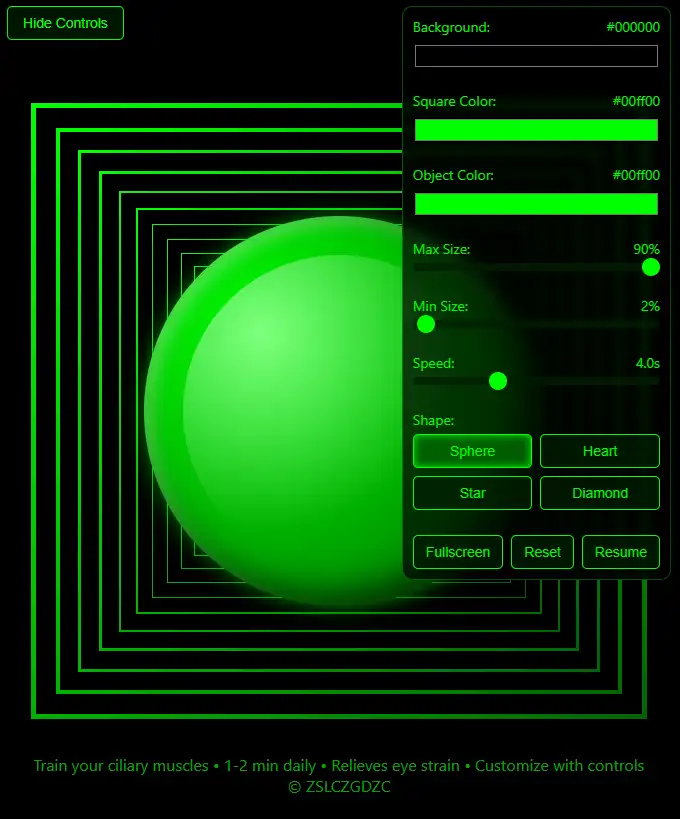
This browser-based online trainer turns classic eye focus drills into a simple interactive tool. A moving target ball travels back and forth along a depth path, and your eyes naturally follow it to alternate between near and far focusing. Key features include:
- Stepless speed control — start slow when fatigued, then increase as your eyes adapt
- Customizable colors — adjust ball, background and trajectory colors for comfort
- Full-screen mode — eliminates distractions during focused training
- One-click reset — restores all settings to defaults for multi-user sharing
No downloads or installations are required. Launch the tool directly in your browser during short work breaks or study sessions.
Step-by-Step Guide to Near Far Eye Accommodation Training
- Posture preparation: Sit upright in a well-lit room. Keep your head still and look naturally toward the center of the screen. Move only your eyes to follow the target ball.
- Speed setting: Beginners and users with heavy eye fatigue should start at the lowest speed. Increase gradually as your eyes adapt.
- Color customization: Adjust the ball color, background color and trajectory line color to a soft combination that feels comfortable. Avoid harsh high-contrast settings.
- Follow the recommended schedule: Do 2–3 sessions per day, 1–2 minutes each. Short, regular sessions work better than one long session.
- Maintain consistency: Make this eye exercise part of your daily routine, especially after long screen periods.
Who Is This Training Suitable For?
This near far eye accommodation training works well for:
- Office workers spending long hours on desktop computers
- Students studying with laptops, tablets and smartphones
- Screen users experiencing eye soreness, dryness, heavy eyes or slow focus switching
- Anyone who wants to maintain ciliary muscle elasticity through daily eye exercises
- Healthy users without diagnosed eye conditions who need regular eye relaxation
Users with myopia, hyperopia or astigmatism should wear properly fitted corrective glasses during training for the best comfort and results.
Safety Precautions & Disclaimer
Stop training immediately and rest your eyes if you experience eye pain, dizziness, nausea or blurred vision. Do not force yourself to continue.
Disclaimer: This online tool is an auxiliary daily visual training solution. It cannot replace professional ophthalmic examinations, medical diagnosis or clinical treatment. It is a fully digital online service; no physical product or shipment is provided.
The Near-Far Ocular Accommodation Trainer is designed solely for daily eye relaxation and ciliary muscle training. It does not offer medical diagnosis, eye disease treatment or vision correction. Please visit a qualified eye care professional if you have persistent discomfort or abnormal vision.
These statements have not been evaluated by the Food and Drug Administration. This tool is not intended to diagnose, treat, cure, or prevent any disease.
Wrap Up
Daily near far eye accommodation training is a simple way to counteract computer vision syndrome from heavy screen time. The Near-Far Ocular Accommodation Trainer brings classic eye focus exercise directly to your browser, adjustable for your eyes and suitable for short work breaks.
Try it now: https://www.czgdzc.top/near-far-ocular-accommodation-trainer/
Frequently Asked Questions
What is near far eye accommodation training used for?
This online tool helps relax ciliary muscles and ease digital eye fatigue caused by long screen time. It guides users through focus-shifting eye workouts that alternate between near and far targets.
How often should I practice near far eye accommodation training?
We recommend 2–3 short sessions per day, 1–2 minutes each. Short, consistent practice is more effective than one long session.
What is the difference between figure-eight and near-far eye training?
The figure-eight trainer exercises extraocular muscles and eye tracking skills. The near-far accommodation trainer targets the ciliary muscle and eye accommodation flexibility. They complement each other.
Can this training replace professional eye treatment?
No. This eye exercise tool cannot replace medical examination or clinical treatment. It only serves as a daily relaxation exercise for temporary screen-related eye discomfort.